Lock Scheduler: Automated Class Scheduling System for SRJC
A case study on Lock Scheduler, a desktop application I built to replace a manual, multi-source Excel scheduling workflow at Santa Rosa Junior College (SRJC). The district police, custodial, and maintenance teams depended on those schedules every day, and the old process was slow and error-prone.
Background
At SRJC, scheduling is operationally critical. The district police use schedules to program door locks and secure buildings; custodians rely on them to clean classrooms and event spaces; maintenance teams need them to plan technical work.
I was brought in as a temporary replacement for an administrative assistant who had held the role for 16 years. Each semester she received the full course schedule and manually keyed it into an Excel file. At the end of every week she combined that file with the Student Information System (SIS) and the Event Management System (EMS) to produce the schedules the relevant parties needed. It was labor-intensive and, with multiple sources of truth and manual entry, prone to errors.
Understanding the problem
Before changing anything, I kept the manual process running and held meetings with every stakeholder group. Two main consumers emerged:
- District police needed a schedule of building opening and closing times to lock and unlock campuses, plus a detailed daily class schedule and a daily events list. These were essential for campus security.
- Custodial and maintenance staff also needed the daily class schedule and events list, but their real need was different: a view of what was happening at any given moment, sorted so they could plan cleaning and repairs around live activity.
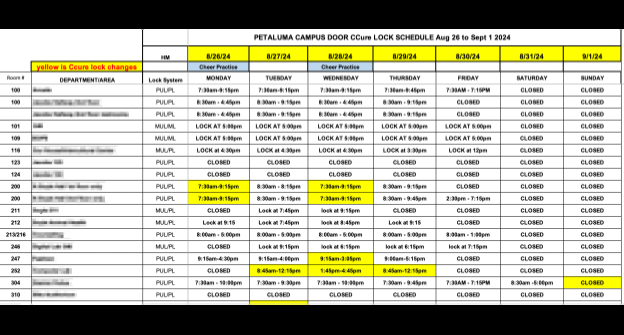
The old workflow used a single Excel file for lock schedules, seven daily class schedules, and a separate events list. It was slow, and with several competing sources of truth it was hard to know which was accurate.
Technical requirements
A few constraints shaped the design:
- Data security. I stored data locally rather than in a cloud system. Most stakeholders only consumed the exported documents, so direct data access wasn’t needed, and the local approach avoided reliance on a cooperative cloud/SSO setup that wasn’t available. I still kept scalability in mind.
- Usability. The position required no technical expertise, so the interface had to be simple and approachable for whoever filled the role next.
- No direct database access. Class and event data were only viewable as HTML and Excel exports from two different systems. Re-keying that by hand would have preserved all the original risk and effort, so the tool had to import it automatically.
The final product
After six weeks, Lock Scheduler was ready. Transitioning a manual process in an organization is delicate, so I ran it in parallel with the old workflow for a few weeks to verify quality before cutting over.
The application is built with Python, SQLite for storage, and wxPython for the interface. To the end user it behaves like a regular Windows application.

-
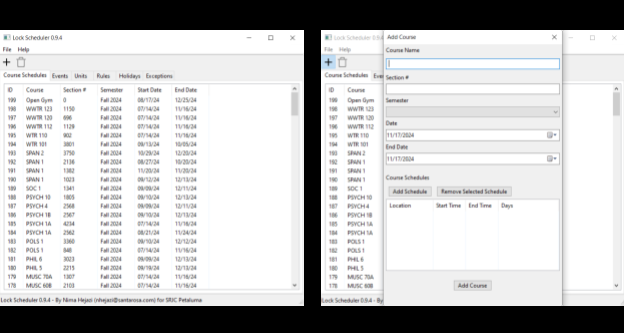
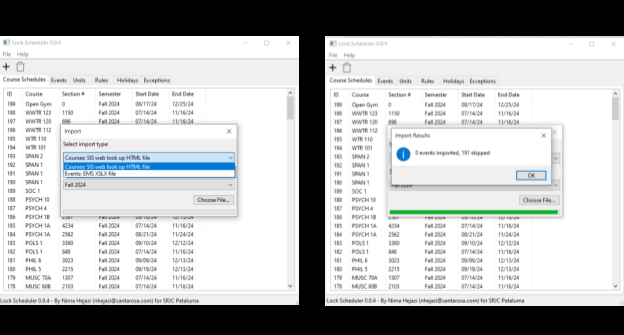
Automated import. Data from the two source systems loads into the software in under 15 seconds, compared with the days the manual process took.
-
Validation. Automated importing, duplicate detection, and error validation remove the human-error class of mistakes entirely.
-
Portable exports. Rather than Excel, documents export as PDF for maximum portability and consistent rendering.
-
Audience-specific layouts. Custodial and maintenance staff get a table sorted by day, building, class, and time, so they can see what’s happening at any moment.
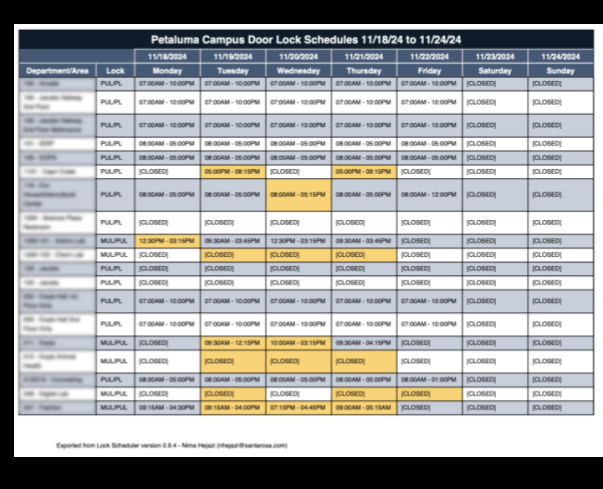
District police get daily schedules sorted by start time, plus a shared weekly events schedule for the campus.
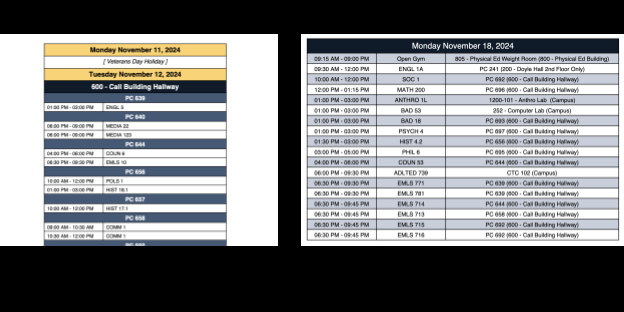
Both groups also receive a weekly schedule of events on campus.
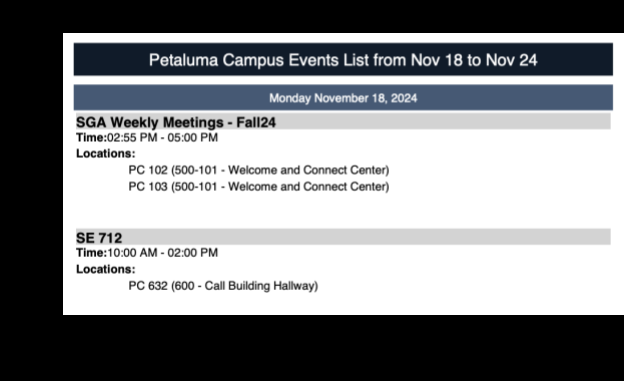
Results
The system delivered measurable improvements:
- Scheduling errors down 94%, from an average of 18 errors to just 1, driven by automated import, duplicate detection, and validation.
- Scheduling time down 98%, from an average of 10 hours per week to about 15 minutes, freeing staff for higher-value work.
- Strong adoption: faculty and administrators praised the system for its ease of use and reliability.